
Strata Solids
To access this screen:
-
Activate the Reserves ribbon and select Strata Solids (strata volumes must exist for the current project).
The Strata Solids task is part of the managed reserves workflow. Specifically, this task is used to segment your established phase solids (as created by the Create Solids task) using the strata volumes created by the Define Strata task.
Strata solids are created on a phase-by-phase basis. Optionally,
you can display your strata volumes alongside your phase-strata-solid
results, for example: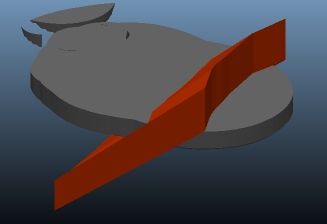
Activity steps:
-
Display the Strata Solids screen.
-
Select the Pit containing the phase solids to be segmented with strata data.
-
Check Display pit strata to display the strata volumes associated with the current pit. By default, all strata volumes will be displayed but you can refine this by changing the filtering controls below..
-
The Phase-strata-solid table lists all phases that have been defined for the selected Pit.
To generate Strata Solids for a phase, a phase solid must already exist, as generated by the Create Solids task. Table contents are read-only.
-
Select a table row (any cell) and click Create to generate the Strata Solid(s) for that phase, or you can click Create All to create strata solids for all phases where a phase solid has been created.
-
Check Filter display of mining phase strata solids to filter the view of 3D data to display a selected strata volume. To display a strata volume, it must have been generated by the Define Strata task, and Display pit strata must also be checked (see above).
-
Use Remove solids with maximum thickness below to remove volumes from the output if their maximum thickness fall below a specified value.
-
Save your task.
-
Save your project.
Related topics and activities
